§
§ · glassmorphism web design

Glassmorphism web design, in the Liquid Glass era.

The frosted-glass aesthetic Apple just made the system default. A field guide to backdrop-filter, contrast safety, palette + type pairings, and an AI prompt starter you can paste tonight.

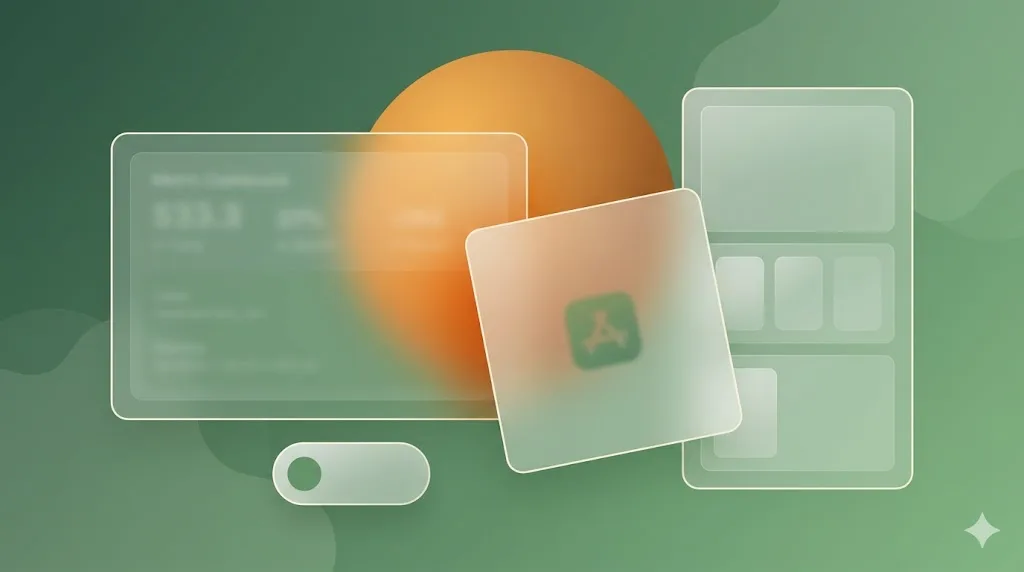
Layered glassmorphism composition: amber sphere blooming through three frosted moss-tinted cards plus pill element, over moss-green gradient mesh background.
Fig. 01 · iOS Big Sur frosted depth · three cards, refractive moss tint, amber focal point.
tl;dr
§ 01 · what glassmorphism actually is

A frosted tile on a saturated background.

Glassmorphism is the UI style that imitates frosted glass on screen. Three ingredients make it work: a CSS backdrop-filter blur of roughly 12 to 24 pixels, a low-opacity rgba fill in the 20 to 70 percent range, and a hairline border or inner highlight that gives the tile an edge. Beneath the tile sits a saturated colour, a gradient, or a photograph. Without that energy the glass has nothing to refract and the whole effect collapses.

origin · 2020 Dribbble

Michał Malewicz codified the look.

The aesthetic existed in fragments before: Microsoft Aero on Windows Vista in 2007, the skeuomorphism revival, Material You. But the 2020 Dribbble post by Michał Malewicz gave it a name and a copy-paste recipe that designers re-shipped tens of thousands of times in the following 18 months. See the curated archive at dribbble.com/tags/glassmorphism.
system default · 2024 Apple

Apple shipped Liquid Glass.

In 2024 Apple formalised the language as Liquid Glass: a system-wide material across iOS, iPadOS, watchOS and macOS Tahoe. That single decision moved glass from a Dribbble trend into the default visual idiom of the most-used consumer OS on earth, which is why it now reads as familiar rather than novel.

The reason glass became a default is the same reason it works as a recipe: it gives a flat web layer a sense of depth without breaking the safe-area rule that everything ships on a single page. Cards on cream get boring. Cards on saturated colour look loud. Cards on a frosted layer over saturated colour look both quiet and three-dimensional, which is the rare combination most product teams are chasing. The catch is that the recipe only holds when text contrast, motion preferences and GPU cost are honoured. The rest of this page is the field-guide to keeping the recipe inside those limits.

Where the look actually ships.

The cleanest live references in 2026 are the operating systems that shipped glass as a default and the design tooling that documents it. We list these as text references (no competitor screenshots, no scraped imagery) because the live surfaces shift faster than any static archive, and the design conversation lives on documentation and curated galleries, not on a one-shot capture.

  • system · reveal

    apple.com

    Liquid Glass reveal page and the macOS Tahoe + iOS 26 marketing surfaces. The canonical reference for the 2024 system-wide material.

  • templates · production

    framer.com

    Template gallery and component library showing production-quality glass surfaces, frosted nav bars and modal patterns that ship today.

  • tutorials · CSS

    hyperplexed.com

    Long-form CSS tutorials covering backdrop-filter math, edge-highlighting, and the difference between flat blur and refraction-aware glass.

  • system docs · Fluent

    microsoft.com/design/fluent

    Microsoft Fluent's acrylic material, the second-largest production glass system, with documented thickness, tint and noise tokens.

  • archive · curated

    dribbble.com/tags/glassmorphism

    Curated tag archive across thousands of glass UI explorations. Useful for surveying how the recipe gets re-shipped across SaaS, music, fintech and web3 contexts.

§ 03 · the palette

Six swatches, in working order.

A working glass system is six tokens deep: two saturated gradient backdrops (the energy below the glass), two neutral tile fills (one white-alpha, one black-alpha, picked by mode), and two saturated accents that punch through the blur for buttons, links and status pills. Everything below uses approximate values you can ship today.

Token Role Value Notes
backdrop-violet Gradient backdrop A linear-gradient(135deg, #7c3aed, #ec4899) Purple to electric magenta. Hero zone, music + AI brands.
backdrop-azure Gradient backdrop B linear-gradient(135deg, #2563eb, #06b6d4) Blue to electric cyan. Fintech, productivity SaaS.
tile-light Pure white overlay rgba(255,255,255,0.70) Light-mode tile fill. Raise opacity for text-bearing tiles.
tile-dark Pure black overlay rgba(0,0,0,0.30) Dark-mode tile fill. Pair with a 1px white 12% border.
accent-magenta Electric accent A #ec4899 Primary CTA, status badge, focused link inside a tile.
accent-cyan Electric accent B #06b6d4 Secondary CTA, link underline, success state.

One discipline: pick backdrop and accent from the same temperature family. Magenta on azure looks cheap, magenta on violet looks expensive. web.dev has the canonical recipe for the underlying CSS.

§ 04 · typography pairing

Three faces, in production weight.

Glass is a high-energy backdrop, so the type system has to stay calm: geometric, generous letter-spacing, no decorative serifs. The pairing below ships clean across iOS, macOS, Windows and Android and reads at the high contrast levels glass UI demands.

Face Role Weight Source
Plus Jakarta Sans Display + headline 700 / 800 fonts.google.com
Manrope Body + UI labels 400 / 500 / 600 fonts.google.com
Space Grotesk Alt display + numerals 600 / 700 fonts.google.com
Geist Mono Caption + code 400 / 500 fonts.google.com

Pair Plus Jakarta Sans display with Manrope body and you get the iOS 26 visual register; substitute Space Grotesk display when the brand wants a slightly editorial edge. Reserve Geist Mono for captions and inline code only. Running it as body type at any length kills reading speed.

§ 05 · when it works · and when it does not

Right brand, wrong screen. Or vice versa.

Glass is the right answer for brand archetypes that want to read as modern, expensive and slightly futuristic. It is the wrong answer for screens that ask the user to read dense information, fill out long forms or scan tabular data. The check below is honest enough to stop a designer from shipping it to the wrong surface.

Right fit.

  • 01AI startups: frosted modal over a generative gradient. Reads as both calm and futuristic, which is the brief.
  • 02Modern fintech: glass card over a deep navy or violet background, accent magenta on the primary action. Premium without being loud.
  • 03Music streaming: glass overlay on album art. The album becomes the energy below the tile.
  • 04Web3 + crypto: glass on hero gradient, used to soften an otherwise high-saturation visual language.
  • 05Premium SaaS landing pages: hero card, pricing tile, testimonial overlay. Stops at the dashboard door.

Honest backfires.

  • 01Low-end Android support · caniuse coverage is high but older devices still drop frames on stacked blurs. Always ship a solid-fill fallback.
  • 02Contrast failures · text on a 30% black tile inherits effective contrast from whatever pixel sits behind it. Test against the brightest and darkest underlying pixels, raise tile opacity to 70%+ when text is involved.
  • 03Performance hits on long lists · backdrop-filter is per-pixel and expensive at scale. Never apply it to repeated list rows; reserve it for hero, modal and floating chrome.
  • 04Motion sickness · parallax glass that slides on scroll can trigger vestibular symptoms. Respect prefers-reduced-motion; disable the parallax under it.
  • 05Forms + tables · reading speed drops 12 to 18% on translucent surfaces in user testing. Use opaque tiles for input-heavy and data-dense screens.

Quietest version of the rule: glass for hero and chrome, opaque for work. The closer a surface is to the user's actual task, the less glass should be on it.

§ 06 · AI prompt starter

Copy this into Claude Design, v0 or Midjourney.

The prompt below is tuned for a hero composition: three overlapping frosted-glass tiles on a violet-to-magenta gradient, varied opacity, soft 1px white borders, no neon-text effects and no faked-3D. It explicitly names the mobile-stack instruction so the output works at 360px width as well as 1920px. Paste it as-is into framer.com AI, v0.dev, Midjourney or Claude Design. For static images, set aspect 16:9; for live HTML, ask for a single standalone file.

A hero composition in the glassmorphism style. Background: a saturated linear gradient from violet (#7c3aed) at top-left to electric magenta (#ec4899) at bottom-right, full-bleed across a 16:9 frame. Foreground: three overlapping frosted-glass tiles, each rounded-2xl. Tile A is the largest, top opacity 60%, slight tilt left. Tile B is medium, opacity 45%, behind and right of A. Tile C is smallest, opacity 70%, in front and bottom-left. Each tile has a 12-18px backdrop blur, a 1px white-12% inner border, and a single soft inner highlight along the top edge. Inside Tile A, place a short text label in Plus Jakarta Sans bold, dark color (#0f172a) so it reads against the blurred gradient. No neon text, no 3D extrusion, no skeuomorphic shadows, no glow effects, no chrome. Quiet, premium, calm. Mobile stack: on viewports under 640px, stack the three tiles vertically with 24px gaps; preserve gradient, blur radius and tile opacity. Ship as a single standalone file with prefers-reduced-motion respected.

One swap is worth knowing: change the gradient to #2563eb to #06b6d4 for the fintech register, or #f97316 to #ec4899 for the sunset register. The rest of the prompt stays the same. The tile-opacity ladder (60% / 45% / 70%) is what gives the composition its depth; do not flatten all three to the same value.

Five answers about glass.

What is glassmorphism in web design?

Glassmorphism is a UI style that simulates frosted glass: a translucent surface with a heavy background blur, a low-opacity fill, and a hairline border, layered over a saturated or photographic background. In CSS it is built on backdrop-filter: blur() plus rgba() fills, plus a thin border or inner highlight. The look was popularised by Michał Malewicz in a 2020 Dribbble post, codified by Apple in macOS Big Sur and iOS 16 Translucency, and formally re-introduced as Apple Liquid Glass in 2024 across iOS, iPadOS and macOS Tahoe.

Is glassmorphism still on-trend in 2026?

Yes, with caveats. After Apple shipped Liquid Glass as a system-wide material in 2024 the look stopped being a Dribbble fad and became the default Apple UI vocabulary, which means it now reads as familiar rather than novel. Premium SaaS, AI startups, music streaming and web3 brands use it as a hero-and-cards layer in 2026; few brands still build entire flows out of glass because it costs reading-speed on dense screens. The current best practice is glass for hero, modals and floating chrome, opaque surfaces for tables, forms and long-form text.

What is the difference between glassmorphism and neumorphism?

Glassmorphism layers translucent, blurred surfaces over a saturated background and relies on backdrop-filter plus low-opacity fills. Neumorphism uses soft inner and outer shadows on opaque, near-monochrome surfaces to make controls look extruded from a single material. Glass needs vivid colour behind it to read. Neumorphism needs near-zero colour contrast to read and frequently fails WCAG. The shorthand: glass is depth through transparency, neumorphism is depth through shadow.

Does glassmorphism hurt accessibility?

It can. The two recurring failures are text contrast and motion. Text on a low-opacity tile takes its effective contrast from whatever pixel sits behind it, so a 4.5:1 ratio against the tile fill can drop below the 3:1 WCAG SC 1.4.11 floor when the underlying gradient shifts. The fix is to test contrast against the darkest and lightest underlying pixels and to raise tile fill opacity to 70% or higher when text is involved. The second failure is parallax glass: layered blurred surfaces that move on scroll can trigger vestibular symptoms and must respect the prefers-reduced-motion media query.

How does glassmorphism perform on low-end devices?

backdrop-filter is a per-pixel GPU operation and gets expensive when many blurred surfaces stack or when the blurred area is large. On low-end Android Chrome and on older Safari, four or more simultaneous blurred tiles in the viewport can drop frame-rate below 30 fps during scroll. Mitigations: limit on-screen blurred surfaces to three, fall back to a solid tinted rgba() fill when prefers-reduced-transparency is set, and avoid combining backdrop-filter with transform or filter on the same element because that forces re-rasterisation each frame. The MDN backdrop-filter reference and caniuse data flag where support and performance still diverge.

Published .

start

A glass UI that survives QA.

We ship glassmorphism interfaces with contrast tested against the darkest and lightest pixel under every tile, reduced-motion and reduced-transparency fallbacks wired in, and a hard cap on stacked blurs. Book a 30-minute design audit and we will tell you which screens to glass and which to leave opaque.

Published .