ring 01 · app store
Review queue, signing, provisioning, privacy labels, TestFlight. Every shipped iOS app passes this ring.
A Swift-6 + SwiftUI-first iOS practice for DTC, SaaS, fintech, and health brands shipping native iPhone, iPad, and visionOS apps with Live Activities, Widgets, App Clips, and the Apple platform surface done right.
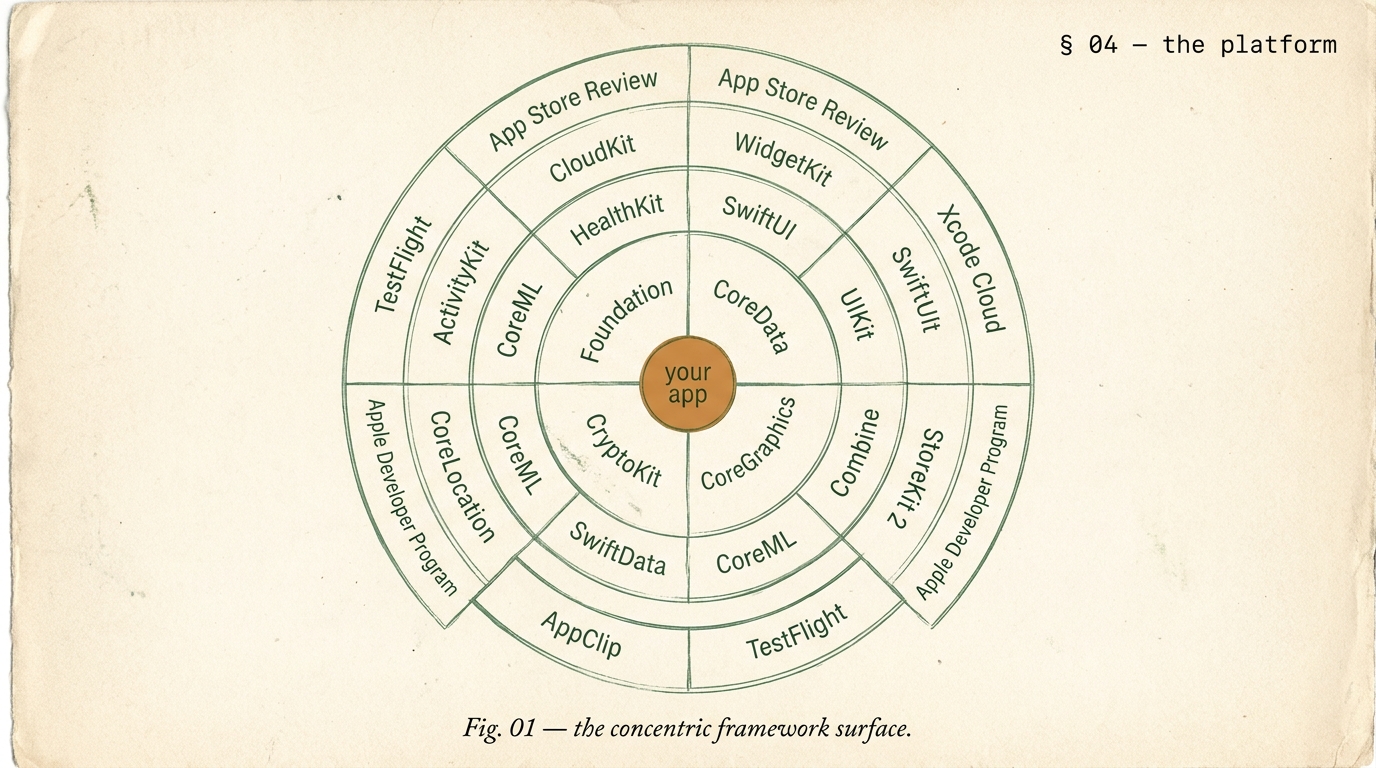
Every iOS app lives somewhere on a five-ring stack. The outer ring is App Store submission and signing. Inside that, SwiftUI with the platform affordances only it exposes (WidgetKit, Live Activities, App Clips, visionOS volumes). Inside that, UIKit still bridges the edge cases. Deeper, Foundation and the specialized frameworks (HealthKit, StoreKit 2, CoreML, CloudKit). And at the core, your app's domain logic in Swift 6. Knowing which ring each feature lives in tells you how much of Apple's platform you are earning.
Review queue, signing, provisioning, privacy labels, TestFlight. Every shipped iOS app passes this ring.
Declarative UI, Widgets, Live Activities, App Clips, focus filters, visionOS volumes. Default for new builds.
Still needed for complex collection views, legacy interop, some framework edges. Clean SwiftUI interop.
HealthKit, StoreKit 2, CoreML, CoreLocation, CloudKit. Where Apple-platform apps earn their feel.
Your domain. Strict concurrency, actors, async/await. Non-negotiable for 2026 builds.
Count how many rings your app uses. Apps that use only rings 1-2 could be React Native. Apps using 3-5 are genuinely native.
SwiftUI in 2026 has reached production maturity. Every Apple-platform affordance shipped since 2020 (Widgets, Live Activities, App Clips, visionOS, focus filters) is SwiftUI-only or SwiftUI-first. UIKit still handles specific edge cases cleanly through UIViewRepresentable and UIHostingController. The table below names when each framework wins.
| need | SwiftUI (default) | UIKit (where) |
|---|---|---|
| navigation | NavigationStack, NavigationSplitView | legacy UINavigationController integration |
| lists + collections | List, LazyVGrid, LazyVStack | UICollectionViewCompositionalLayout edge cases |
| widgets + live activities | SwiftUI only | not applicable |
| app clips | SwiftUI only | not applicable |
| visionOS | SwiftUI + RealityKit | not applicable |
| complex video or AR | SwiftUI + UIViewRepresentable wrapping | AVKit, ARKit bridged |
Every iOS app has an icon and a screen. What separates a port from a native-feeling app is the platform surface it uses. Live Activities on the Lock Screen. Widgets on Home Screen and Today View. App Clips for first-use-before-install. HealthKit for genuinely-owned health data. The list below is the platform surface we ship when a brand's use case earns it.
Ongoing real-time updates on Lock Screen + Dynamic Island. Orders, rides, matches, workouts.
Home Screen + Today View + StandBy + Lock Screen widgets via WidgetKit and ControlWidget.
Launch-without-install flows for point-of-sale, parking, menus, one-tap use cases.
Read + write health data with user permission. Workouts, heart rate, mindfulness, sleep.
On-device ML: image classification, text recognition, sound classification, custom models.
In-app purchases and subscriptions. Swift-native API, signed transaction receipts, family sharing.
iCloud-backed sync across user devices. Public and private databases, no server needed.
Spatial volumes, RealityKit content, Look-to-Dwell. When the brand fits spatial computing.
Three layers of confidence. Swift Testing (the newer replacement for XCTest) for unit tests on pure logic, view models, and async code. UI tests with XCUITest for critical user flows. TestFlight for real-user beta distribution with up to 10,000 external testers, crash reporting, and per-version feedback. Every build runs through CI (Xcode Cloud or GitHub Actions) before distribution.
| metric | target | note |
|---|---|---|
| cold launch | < 1.5s | iPhone 12 + newer |
| warm launch | < 400ms | in-process resume |
| scroll fps | 120 fps | ProMotion-capable devices |
| binary size | < 35 MB | thinned IPA |
| crash-free | > 99.8% | 30-day rolling |
Health and fitness tracker with HealthKit integration for workouts, heart rate, sleep. WidgetKit for Home Screen and Lock Screen. Live Activities for in-progress workouts. SwiftUI + Swift 6. 16 weeks.
Consumer fintech app, iOS launched first. Live Activities for transfers in progress. Apple Pay integration, Sign in with Apple, biometric auth via LocalAuthentication, Secure Enclave. 18 weeks.
2 weeks. Platform surface, Swift 6 path, review pre-check. Refundable.
10-16 weeks. SwiftUI + Swift 6 + store submit.
14-22 weeks. Live Activities, Widgets, Clips, HealthKit, IAP.
16-26 weeks. iPhone + iPad + visionOS one codebase.
Three signals favor native iOS. One, your app depends on Apple-platform affordances (Live Activities, Widgets, App Clips, HealthKit, CoreML, visionOS) where cross-platform frameworks either do not support them or support them poorly. Two, the iOS experience is the primary differentiator and pixel-perfect native feel matters more than cross-platform parity. Three, you are iOS-only for the first year and plan to cross-platform later, in which case native buys you time to validate before the cross-platform cost. Otherwise, React Native or Flutter with native modules covers 80 percent of use cases. We build all three; the decision is about what your app does, not about our preference.
US and UK senior iOS engineers are $160 to $220 per hour at boutique agencies; Indian senior iOS engineers are $100 to $150 per hour. A Swift 6 + SwiftUI MVP with 15 to 25 screens, auth, push, and store submission runs 10 to 16 weeks. A full production iOS app with Live Activities, Widgets, App Clips, HealthKit, in-app purchases, and CloudKit sync runs 14 to 22 weeks. An iPhone + iPad + visionOS build from one shared codebase runs 16 to 26 weeks. A 2-week audit is refundable. Scoped quote in 48 hours.
SwiftUI for new builds, always. UIKit for specific edge cases. SwiftUI in 2026 has reached production maturity: the framework handles navigation (NavigationStack), lists at scale (List with Identifiable data), collection-view-equivalent layouts (LazyVGrid, LazyHGrid), animations, custom shape work, and the platform-specific surfaces (Widgets, Live Activities, visionOS) that are SwiftUI-only in the first place. Edge cases where UIKit still wins: very complex collection views with fine-grained cell reuse needs, legacy codebases still in UIKit where mixing adds more cost than it saves, and some specific framework integrations that have not caught up. For new builds: SwiftUI first, UIKit bridge only where proven necessary.
Apple Developer Program membership ($99/year) under your legal entity, App Store Connect app record, provisioning profiles and signing certificates (we manage these via Xcode Cloud or manual signing), app icons in every required size, screenshots for every device size you claim to support (iPhone 15 Pro Max, iPhone SE, iPad Pro 12.9, iPad Pro 11), App Privacy label describing every data type collected, Data Safety disclosure, privacy policy URL, support URL, and an App Review Information contact. The first submission typically takes 1 to 3 days of review. Rejection rate has gone up since 2024's stricter guidelines; we run a guideline pre-check before submitting to catch the common failures (account deletion flow, subscription disclosures, privacy manifest).
StoreKit 2 is the default for any new iOS build. Swift-first API, async/await, JWS-signed transaction receipts verified directly, no need for a third-party receipt validation service. We implement subscription products, non-consumable and consumable purchases, intro offers, promotional offers, and family sharing entitlement handling. Backend receipt validation goes through Apple's App Store Server Notifications V2 for real-time events. For brands shipping hybrid (Apple + Google Play + web) we abstract the purchase layer so the core subscription logic is platform-agnostic.
Yes. For brands shipping a universal app (iPhone + iPad + visionOS), SwiftUI lets us share most of the codebase with per-platform adaptations via platform-specific modifiers and availability checks. iPad-specific affordances (split view, slide over, sidebar navigation, pointer interactions, hardware keyboard shortcuts) get dedicated treatment. visionOS work adds 3D volumes, spatial audio, and Look-to-Dwell interactions; we scope visionOS as an add-on to an iPhone/iPad build when the brand's use case fits spatial computing.
Swift 6 strict concurrency is non-negotiable for new builds. We enable complete concurrency checking, use @Sendable and @MainActor annotations correctly from the start, and design the data layer around actors. Async/await is the default for any I/O. The first 2 weeks of a new engagement include a concurrency architecture pass where we decide which actors own which state. Teams new to Swift 6 sometimes find this a slower start; the payoff is zero data races and a codebase that compiles cleanly on every future Swift version.
You do. Apple Developer Program membership under your legal entity. Signing certificates and provisioning profiles managed in your developer account; we access as added team members, removable any time. GitHub repository under your organization from day one. TestFlight beta group and App Store Connect access under your control. On exit: credentials rotated, repository transferred, Xcode Cloud or CI configuration documented, 30-day support tail. No lock-in.
Two weeks. Platform surface, Swift 6 migration, App Store review pre-check. Refundable. Scoped quote in 48 hours.