target 01 · ios
AOT native ARM compile. Impeller renderer default. Cupertino widgets for platform-idiomatic UI.
A Dart-first Flutter practice for brands needing one codebase that ships to iOS, Android, web, Windows, macOS, Linux, and embedded targets with pixel-identical UI and the Impeller renderer.
Flutter's thesis is different from React Native's: instead of bridging to native platform widgets, Flutter draws every pixel itself through the Impeller renderer. The payoff is pixel-identical UI across every platform and a single codebase that compiles to iOS, Android, web, Windows, macOS, Linux, and embedded targets. The cost is a larger binary size and less access to platform-idiomatic widgets by default. For brands where "one UI everywhere" outweighs "native look", Flutter wins.
AOT native ARM compile. Impeller renderer default. Cupertino widgets for platform-idiomatic UI.
AOT native ARM + x64. Material 3 default. Impeller opt-in.
Dart → JS or WASM. CanvasKit for pixel parity, HTML renderer for lighter output. Right for internal tools.
macOS, Windows, Linux stable. Native windowing, menus, file system.
ARM Linux, automotive, kiosk via Flutter Embedder. Specialist territory.
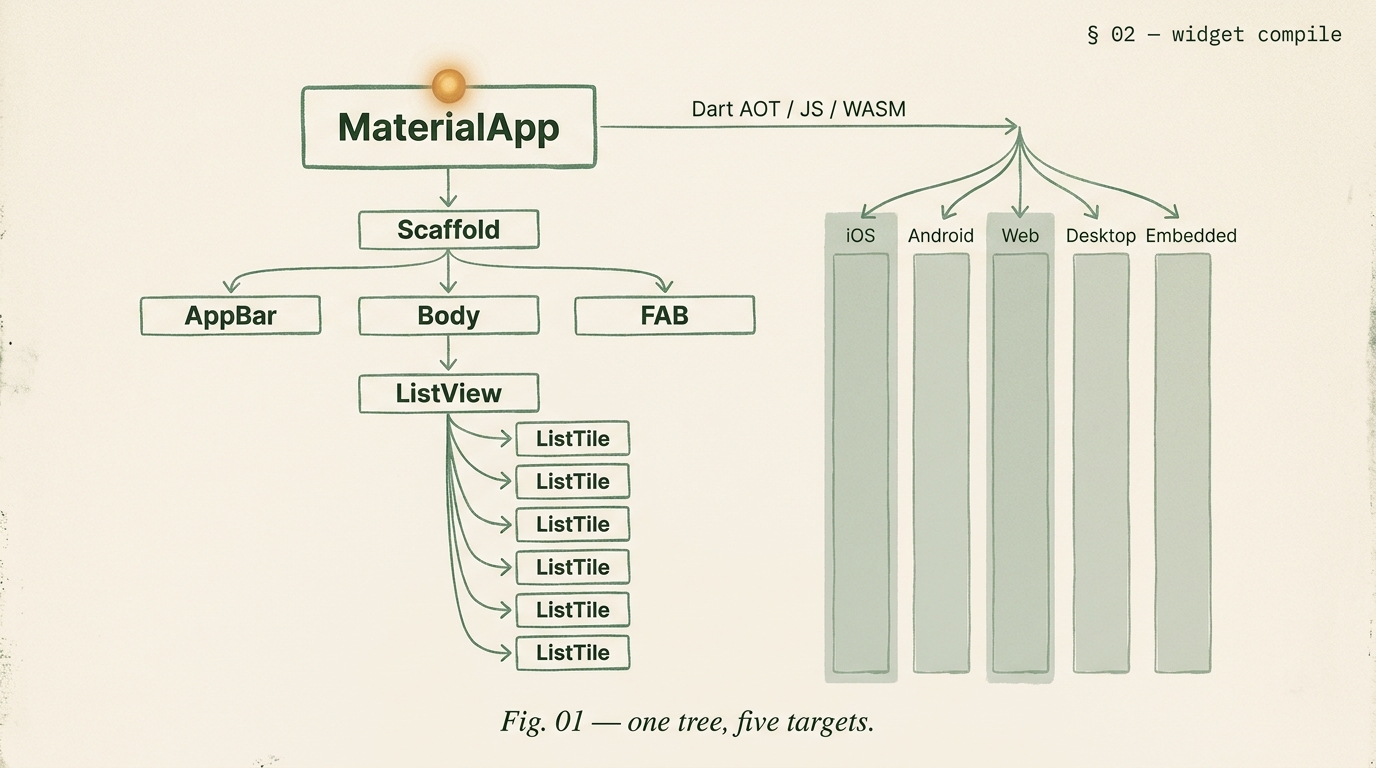
Flutter's widget tree renders identically on every platform because Flutter owns the rendering layer. The animation below visualises how Dart compiles to each of the five targets.
| dimension | Flutter | React Native |
|---|---|---|
| rendering | Impeller (Flutter owns pixels) | bridges to native widgets |
| UI parity across platforms | pixel-identical | native-feeling on each |
| target platforms | iOS, Android, web, desktop, embedded | iOS, Android (web/desktop via 3rd party) |
| language | Dart | TypeScript |
| binary size | larger (ships renderer) | smaller |
| OTA updates | not official; via Shorebird | EAS Update first-class |
| best for | multi-platform, UI-consistent, Dart teams | React teams, mobile-first, OTA velocity |
Flutter's state management landscape has stabilized. For new builds we default to Riverpod plus freezed for immutable data. BLoC for large enterprise teams that prefer explicit event-driven architecture. Provider only for legacy migrations. GetX we avoid in production.
Successor to Provider by the same author. Compile-time dependency resolution. Family providers for parameterized state. AsyncValue for async data with loading/error states.
Event-driven architecture. Separation of business logic from UI. Heavier boilerplate, stronger discipline. Right pick for large teams valuing explicitness over terseness.
Acceptable for small apps or ongoing maintenance of Provider codebases. New builds should prefer Riverpod; the conceptual leap is small and the type safety is better.
When Flutter needs to reach into native APIs (CoreBluetooth, HealthKit, Android Keystore), it uses Platform Channels. MethodChannel for one-off calls, EventChannel for native event streams. Most common native integrations already have well-maintained pub.dev packages wrapping the platform calls. For truly custom needs we write a Flutter plugin containing Swift + Kotlin code exposed to Dart through a channel.
Use a maintained pub.dev plugin (camera, location, biometrics, push).
Write a custom plugin with Swift + Kotlin when the need is unique.
FFI for direct C/C++ interop when performance or a native library is required.
| metric | target | notes |
|---|---|---|
| cold start | < 2.0s | mid-tier Android, AOT build |
| frame rate | 60 fps | Impeller renderer, sustained |
| release APK size | < 20 MB | ABI split enabled |
| crash-free | > 99.6% | Firebase Crashlytics, 30-day |
Consumer fintech on iOS, Android, and a progressive web app for account access from any browser. Riverpod, freezed, Firebase Auth, Plaid integration via platform channels. 18 weeks to production on all three targets.
Driver companion app for a logistics company. Offline route lists, barcode scanning via custom Flutter plugin, signature capture, photo upload queue. BLoC for state. 14 weeks.
2 weeks. Platform fit, state reco, channel surface. Refundable.
10-16 weeks. iOS + Android + store submit.
14-22 weeks. Platform channels, offline, IAP, CI/CD.
16-26 weeks. Mobile + web + desktop from one codebase.
Three signals favor Flutter. One, you need to ship beyond mobile (web, desktop, embedded) and want one codebase across all of them. Two, you want pixel-identical UI across iOS and Android because Flutter draws every pixel itself via its own renderer rather than relying on native widget translations. Three, your team has or prefers Dart, or they come from a strong object-oriented background where Dart's type system fits. Three signals favor React Native. One, your team is deeply React and TypeScript already. Two, the app is mobile-only and OTA update velocity matters. Three, the ecosystem of JavaScript libraries matters more than the Flutter widget library. Neither is wrong; they are two excellent frameworks for different team shapes.
US and UK senior Flutter engineers are $135 to $190 per hour; Indian senior engineers are $80 to $130 per hour. A Flutter MVP with Material 3 + Cupertino UI, 15 to 25 screens, auth, push, and store submission runs 10 to 16 weeks. A full production build with platform channels, offline sync, IAP, and custom CI/CD runs 14 to 22 weeks. A multi-platform build targeting mobile + web + desktop runs 16 to 26 weeks. A 2-week audit is refundable. Scoped quote in 48 hours.
For internal tools, dashboards, and progressive web apps shared with mobile, yes. Flutter Web via CanvasKit renderer gives pixel-identical UI to mobile, which is useful when the experience needs to match. For public content-heavy web sites (SEO-critical, large-first-load-sensitive), Flutter Web is rarely the right choice; the initial bundle is large and SEO support is limited. Our rule: Flutter Web is right when the web target is an internal or authenticated experience; wrong when it is a public marketing or content surface.
Riverpod for most new builds. It is the successor to Provider by the same author, with stronger type safety, testable providers, and compile-time dependency resolution. BLoC for teams that prefer explicit event-driven architecture, common in large enterprise apps. Provider for smaller apps or teams migrating from older Flutter codebases where Provider is already in use. We avoid GetX for production builds. The right default for a new Flutter project in 2026 is Riverpod plus freezed for immutable data classes.
Platform channels. Flutter's MethodChannel and EventChannel let Dart code call Swift or Kotlin methods on each platform. For common needs (camera, location, push, biometrics), we use maintained pub.dev packages that wrap the native APIs. For truly custom needs we write a Flutter plugin: Swift code for iOS, Kotlin for Android, exposed to Dart through a channel. The plugin lives in a separate package for reusability. Most Flutter apps need 2 to 5 custom native integrations, all wrapped in plugins.
Usually not. The pragmatic pattern: Material 3 as the primary design system for Android with dynamic color and modern Material UI affordances. Cupertino widgets used on iOS for native-feeling navigation bars, action sheets, and sliders where platform expectation matters. Most of the app (buttons, inputs, layout) uses a shared design system that works on both. We build a design system on top of Material 3 with brand tokens, then override with Cupertino equivalents only where the iOS user expectation would be broken otherwise.
Three options. Codemagic for Flutter-native CI/CD with first-class support for iOS and Android builds, App Store and Play Store submission, and Flutter-specific test running. Fastlane with GitHub Actions or GitLab CI for teams already on those platforms, with the fastlane-plugin-flutter gem. Bitrise for teams needing a mobile-specific but more configurable pipeline. We pick based on the team's existing CI/CD surface; all three work. Signed builds happen in CI; no manual Xcode exports in 2026.
You do. Private GitHub repository under your organization. Apple Developer Program and Google Play Developer Console under your legal entity. Signing certificates in your keychain and keystore (we keep encrypted backups for CI but you own the originals). Push notification providers, analytics, crash reporting all under your billing. DH engineers are named collaborators, removable any time. On exit: repository transferred, credentials rotated, documentation handed off, 30-day support tail.
Two weeks. Platform fit, state recommendation, native channel surface, store readiness. Refundable. Scoped quote in 48 hours.