A commerce-first WooCommerce practice for DTC and B2B brands between $500K and $10M GMV. HPOS migration, Checkout Block extensions, headless Next.js storefronts, and the payment-gateway mesh that stops a single outage from killing a Saturday.
Most WooCommerce stores are running on invisible debt.
We audit WooCommerce stores every week. The debt is consistent. An admin order screen that takes eight seconds to load because orders are still in the legacy wp_posts table instead of HPOS. A checkout page paying a 400 ms cart-fragments AJAX tax on every non-cart visit. A payment stack with exactly one gateway, so when Stripe has a regional outage, Saturday revenue goes to zero. Two subscription plugins with overlapping hooks. A wp_options table with six megabytes of autoloaded rows no one has ever pruned. Each of these made sense at the install moment. Together they explain why a $3M brand feels slower on checkout than a $300K brand and why the engineering team has stopped shipping features.
debt category
typical grade
what it costs
01 HPOS migration status
D
admin order screens 3-8x slower than they should be
02 Checkout Block adoption
D
legacy shortcode checkout, missing every 2024+ conversion feature
03 PHP + WP + Woo versions
C
usually one major version behind, deprecation warnings in logs
04 Object cache (Redis / Memcached)
C
installed, not tuned for WC cache groups, low hit rate
05 wp_options autoload weight
F
3-7 MB autoloaded on every single page request
06 WC REST API auth
B
API keys mostly scoped, rate limiting rarely present
07 Cart fragments TTFB tax
F
200-500 ms added to every non-cart page load
08 Payment tokenization + PCI scope
B
Stripe Elements tokenizing correctly, scope usually SAQ-A
09 Heartbeat + admin-AJAX load
C
default 15s polling hitting server for every admin session
10 WC schema + SEO parity
C
Product schema present, variation canonical handling usually broken
Ten categories. Average grade across the stores we audit in 2026 is a C-minus. Two are D or F. The scorecard is how we open every engagement.
§ 02 · the hpos migration wall
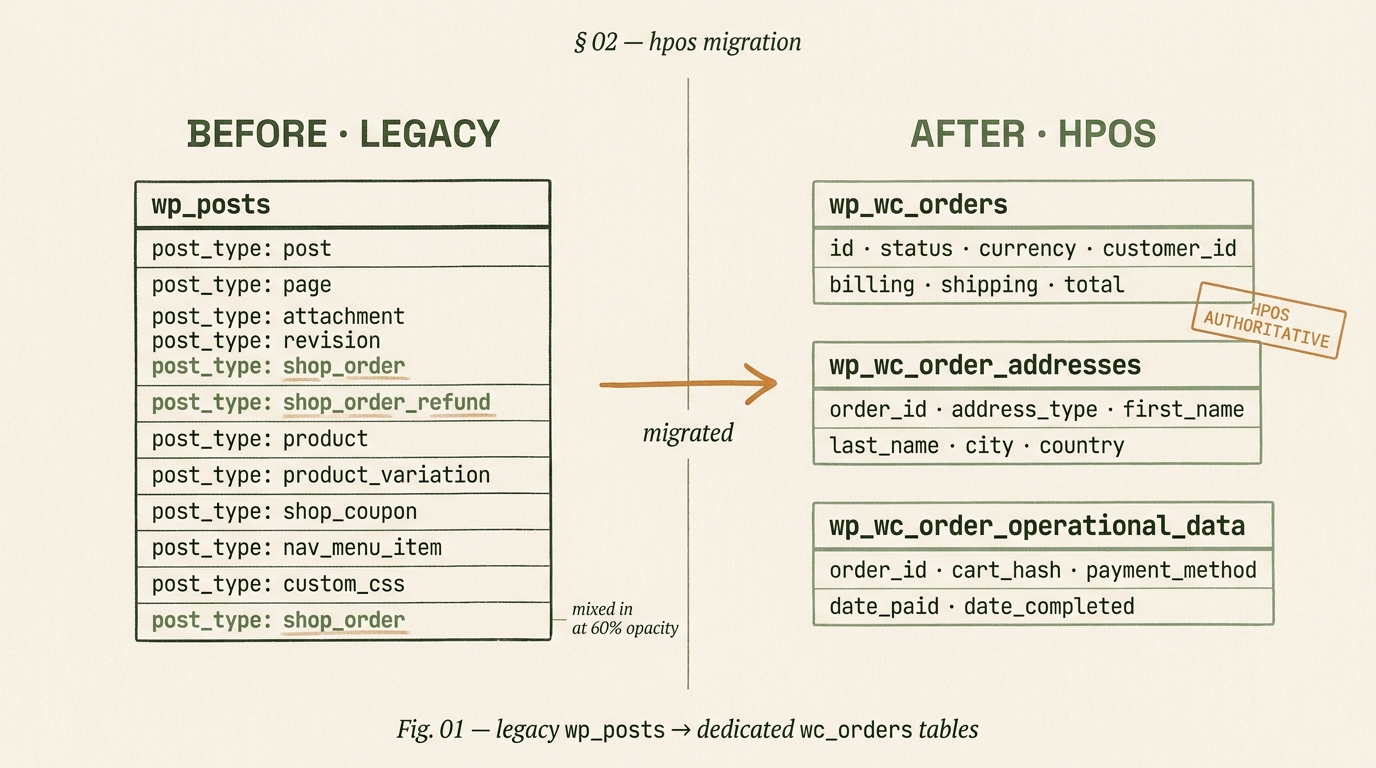
Legacy orders lived in wp_posts. That era is over.
High-Performance Order Storage shipped with WooCommerce 8.2 in late 2023 and became the default for new stores in 8.3. It moves orders out of the shared wp_posts table into dedicated tables: wp_wc_orders, wp_wc_order_addresses, and wp_wc_order_operational_data. The schema is faster to query, cleaner to index, and stops the wp_posts table from bloating on stores past a few hundred thousand orders. Most stores we audit in 2026 have not migrated. The cost shows up in the admin order screen first, then at checkout.
We enable HPOS with legacy tables still authoritative. Orders write to both. Every active plugin audited against its HPOS-readiness declaration. Plugins that still read wp_posts directly get flagged for patch or replacement. Compat runs 2 weeks minimum.
phase 02 · sync validation
Zero drift for 14 days.
The sync worker moves legacy orders into the new tables. We monitor the queue, compare row counts hourly, and validate that every order status update propagates in both directions. We only flip authoritative once drift has been zero for 14 consecutive days.
phase 03 · authoritative
HPOS is the source of truth.
We flip HPOS authoritative, keep legacy tables readable for 30 days as a tested one-command rollback target, then deprecate. Admin order queries drop from 4-8 seconds to 400-800 ms. wp_posts stops bloating. The wall is behind you.
§ 03 · the checkout stack, in motion
Every checkout is a waterfall of waiting. Most stores pay for it.
A WooCommerce checkout request drops through eight layers before the customer sees the pay button: the CDN, nginx and TLS, PHP-FPM boot, WordPress core, the WooCommerce plugin, the cart-fragments AJAX call, the third-party script stack, and the payment-gateway iframe. Most stores have never measured where the milliseconds actually go. The animation below is an illustrative profile of a typical un-tuned store. The bleed is real; the fix is mostly about naming it.
Fig. 2 · checkout stack waterfall · eight layers, one request, every millisecond accounted for
Cart fragments AJAX replaced with a Block-based mini-cart or session-cached fragment; 200 to 500 ms site-wide TTFB win.
Third-party scripts (Meta Pixel, GA4, heatmaps) deferred to idle or first-interaction triggers, not DOMContentLoaded.
Payment Element (Stripe) or hosted-field equivalent lazy-loaded at the payment step; keeps PCI scope SAQ-A.
Object cache tuned with WooCommerce-specific cache groups so cart and account pages stop firing cold queries.
§ 04 · payment gateway mesh
One gateway is one outage away from zero revenue.
Most WooCommerce stores run a single payment gateway. The gateway has a regional outage, Saturday revenue goes to zero, the engineering team hears about it on Sunday from a support email. A gateway mesh is three or four processors routed by region, average order value, and card type, with a tested failover path. The stack below is what we wire for mid-market brands; the matrix names where each gateway earns its place.
default for US, UK, EU; Payment Element is the conversion ceiling
higher fees on low-AOV international cards
WooCommerce Stripe Gateway
PayPal
trust for first-time buyers; required for global reach
dispute handling expensive; chargebacks bite
PayPal Payments
Klarna / Afterpay
AOV above $150; US + UK + AU fashion and home
low-AOV grocery or subscriptions under $50
Klarna Payments for Woo
Authorize.Net
legacy US B2B merchants locked into acquirers
modern conversion features (wallets, Element) missing
WooCommerce Authorize.Net
Razorpay / PayU / Cashfree
India, UPI, domestic card routing
cross-border settlement friction
Razorpay for Woo
Apple Pay / Google Pay
mobile conversion lift, one-tap checkout
desktop share; B2B where cards are manual
via Stripe Payment Element
the failover rule
If the primary gateway's success rate drops below 92 percent for a 5-minute window, the checkout automatically promotes the secondary gateway to default for the next 30 minutes. Admin gets a Slack ping. The policy is boring; that is the point. We implement it via a thin middleware plugin that sits between Woo's payment API and the gateway plugins. No single outage takes a Saturday.
§ 05 · subscription architecture
Subscriptions break differently at every scale. Pick the stack that fits the revenue shape.
Three stacks handle 95 percent of WooCommerce subscription work: the first-party WooCommerce Subscriptions extension, ReCharge with a Woo-compatible bridge, and SureCart as the newer entrant. The wrong choice is rarely catastrophic, but it compounds over 18 months into dunning gaps, proration bugs, and retention-tooling you cannot build yourself.
WC Subscriptions
ReCharge
SureCart
fit
physical goods, minority of revenue
subscriptions are the business
digital goods, courses, SaaS-like
dunning
basic retry logic, Woo-native
industry-best recovery rates, card updater
solid; growing
proration
functional; custom logic for edge cases
handled; mid-cycle product swaps clean
handled for digital goods
retention tooling
build yourself
cancellation flows, bundling, swap + skip
basic included; expanding
headless fit
requires WooGraphQL extension
clean API, docs designed for headless
API-first by design
cost shape
one-time license + host
percentage of subscription revenue
tiered SaaS pricing
Subscriptions under 20 percent of revenue: WooCommerce Subscriptions. Subscriptions over 40 percent of revenue: ReCharge usually pays for itself in dunning recovery alone. Digital-goods only: SureCart is the newer, cleaner bet.
§ 06 · b2b + wholesale on woo
WooCommerce does B2B well. The plugin stack decides how well.
B2B on WooCommerce breaks into three shapes: company accounts and quote-to-order, tiered wholesale pricing, and NET-30 offline payment. Three plugin stacks compete: B2BKing, Wholesale Suite, and the native WooCommerce B2B extension. Each wins a different trade-off. We run all three; the pick comes from how many price tiers you have, how approval-heavy the buyer is, and whether your accounting stack is QuickBooks, Xero, or NetSuite.
stack 01 · b2bking
Company accounts + quotes.
Wins when the buyer is a purchasing agent who requests a quote, routes it for internal approval, then converts. Company-level accounts with sub-users. Quote-to-order flow is clean. RFQ emails threaded in admin.
best for: distributors, industrial, print-on-demand
stack 02 · wholesale suite
Tiered pricing at scale.
Wins when you have 3+ price tiers (retail, wholesale, VIP, distributor), per-role tax handling, and a large catalog. Tax-exempt flows are sharp. Wholesale-only storefronts on subdomains handled well.
best for: CPG brands with wholesale arms, apparel distributors
stack 03 · woocommerce b2b
Automattic-native path.
Wins when you value staying inside the first-party ecosystem and accept fewer edge cases. Fewer moving parts, cleaner upgrades, tighter HPOS integration. Less plugin sprawl.
best for: mid-market brands prioritizing supportability
net-30 and offline payment
NET-30 is a manual-approval payment method wired to your accounting integration. On order, an invoice fires to QuickBooks, Xero, or NetSuite through a connector (ours, or Zapier for smaller volumes). The payment method validates the buyer's credit limit at checkout. Dunning on overdue invoices routes through email and account suspension. The pattern has been stable across every B2B build we have shipped.
§ 07 · headless woocommerce
Headless Woo is the answer to one question, not a default.
Headless WooCommerce on Next.js with WPGraphQL plus the WooGraphQL extension (or Faust.js) is the right answer when a specific question comes up in the brief. It is a wrong answer by default. We turn away more headless briefs than we accept.
headless wins when
✓React-level interactivity on the storefront: configurators, personalization, heavy client state
✓The storefront shares a codebase with a React Native app or a customer portal product
✓Product pages need edge-rendered ISR at scale for CWV ceilings block theme cannot hit
✓Content and commerce feed multiple properties through one API
✓A dedicated frontend team is already in place and hiring for React, not PHP
headless loses when
×Editorial changes happen daily and the team expects pixel-accurate preview
×The engineering budget cannot support two codebases long-term
×Checkout Block on a tuned block theme would hit the same CWV ceiling
×Subscription + B2B + multi-currency all land on the same store (stack complexity compounds)
×SEO URL rewrites and WooCommerce endpoint routing are not budgeted
our headless woo stack, 2026
frontend · Next.js 16 App Router with ISR on product pages, React Server Components on content
data layer · WPGraphQL + WooGraphQL; custom schema additions for subscription and B2B resolvers
cart + session · HTTP-only cookie bridge from Woo session to Next.js; cart state hydrated on edge
payments · Stripe Payment Element or Checkout; PayPal JS SDK; Apple Pay via Stripe
preview · revalidateTag on content save; Woo admin preview link points to a staged Vercel deploy
§ 08 · performance SLA
Core Web Vitals by template, not by homepage.
Most agencies publish a homepage Lighthouse score. WooCommerce revenue does not happen on the homepage. It happens on the product page, the cart, and the checkout. The SLA below is what we hold ourselves to on mid-tier Android over throttled 4G, measured in web.dev field-data alignment. Numbers below are the build-complete targets, not "best case".
template
LCP
INP
CLS
known WC pitfall
homepage
< 2.0s
< 150ms
< 0.05
hero carousel script weight
product (variable)
< 2.3s
< 180ms
< 0.08
variation swatch LCP + gallery shift
collection / shop
< 2.4s
< 180ms
< 0.08
faceted-nav server round trips
cart
< 2.2s
< 200ms
< 0.10
cart fragments AJAX overhead
checkout
< 2.5s
< 200ms
< 0.10
payment iframe late CLS
my-account
< 2.5s
< 200ms
< 0.08
subscription dashboard query depth
If a template misses its SLA in the 90 days after launch, we fix it on our own clock. The SLA is in the statement of work.
§ 09 · security + pci scope
Keep PCI scope at SAQ-A. Harden the rest of the surface.
WooCommerce sites fall into one of two PCI self-assessment categories. SAQ-A: card data never touches your server because the gateway hosts the payment fields (Stripe Elements, Payment Element, hosted checkout). SAQ-A-EP: your site controls the payment page and card data passes through your server even if it is not stored. The second category is the stricter audit and expands your compliance work by roughly 10x. We default every build to SAQ-A and use the hardening checklist below on everything else.
pci scope · checkout architecture
✓Stripe Payment Element or equivalent hosted field; card data tokenized in the gateway iframe
✓No card number, CVV, or expiry ever logged server-side (reviewed in WP debug log config)
✓Webhook endpoints signed with gateway secret, validated on every request
✓TLS 1.2+ enforced; HSTS header set to min 1 year with subdomains
✓Content Security Policy restricting payment iframe to gateway-owned origins only
hardening · everything else
✓XML-RPC disabled; admin URL rotated off /wp-admin
✓2FA enforced on admin, shop_manager, and editor roles
✓WC REST API rate-limited at Cloudflare; application passwords scoped per integration
✓Automatic background updates for Woo minor, WP minor, and PHP extension security
§ 10 · proof · what ships looks like
Two archetype postmortems. Not logos.
Patterns we have shipped for mid-market WooCommerce brands. Metrics are the shape of the work, not a single client's figures. When we run your build, we publish our own before-and-after numbers in the same format.
archetype 01 · DTC skincare, $3.2M GMV
HPOS migration + checkout waterfall fix.
Admin order screen 7.2 seconds to load. Cart fragments AJAX adding 430 ms to every non-cart page. Saturday Stripe outage cost roughly $18K in abandoned checkouts. Four-phase engagement: scorecard audit, HPOS compat + flip, cart-fragments replacement with Block-based mini-cart, Stripe + PayPal failover mesh.
admin load
-88%
7.2s to 860ms
TTFB win
-420ms
site-wide
checkout INP
172ms
from 340ms
archetype 02 · B2B industrial, $6.8M GMV
B2BKing rebuild + headless Next.js frontend.
Legacy Wholesale Suite setup with 4 price tiers, NetSuite integration drifting, no quote-to-order flow. Rebuild on B2BKing, headless Next.js frontend for purchasing-agent UX with saved-order lists and reorder-by-PO. QuickBooks Enterprise integration rebuilt on webhook architecture.
quote-to-PO
3.2 days
from 9 days
reorder rate
+38%
90 days post-launch
support ticket
-54%
billing-related
§ 11 · four engagement shapes
The right engagement shape usually names itself.
Most briefs land in one of four shapes. The scorecard audit comes first for every new client because we refuse to quote a build before we have read the store. Beyond that, the shape fits the debt.
shape 01 · scorecard audit
2 weeks · refundable.
Ten-point Technical Debt Scorecard, written report, 90-minute walkthrough. Refundable against any engagement that follows. You leave with a named remediation plan even if you do not hire us to execute it. Contact for quote.
shape 02 · hpos + performance pass
6 to 10 weeks.
HPOS compat and flip, cart-fragments replacement, object cache tuning, autoload pruning, before-and-after CWV report on every commerce template. Plugin compatibility audit included. Contact for quote.
shape 03 · custom build
10 to 16 weeks.
Block theme with WooCommerce Blocks, Checkout Block extensions, ACF field model, 15 to 30 custom blocks, payment gateway mesh, subscription architecture, editor training. Contact for quote.
shape 04 · headless re-architecture
12 to 20 weeks.
Next.js 16 frontend, WPGraphQL + WooGraphQL data layer, cart and session bridging, Stripe Payment Element, Vercel or Cloudflare edge deploy, ISR on product pages. We talk brands out of this more than we talk them into it. Contact for quote.
§ 12 · fit check
We are the right fit when.
Direct honesty beats pitch honesty. Here is the shape of the brand our WooCommerce practice ships well for, and the shape we tell to go elsewhere.
right fit
●You run between $500K and $10M GMV on WooCommerce and have hit the scale wall.
●You know the admin order screen is slow and you are tired of blaming the host.
●Your checkout abandonment rate has crept up and you suspect performance, not design.
●You are on WooCommerce Subscriptions and it is time to audit whether ReCharge would pay for itself.
●You run B2B or wholesale alongside DTC and the plugin stack is fighting itself.
●You want an honest answer about whether headless is worth the engineering cost.
wrong fit
×You are under $500K GMV and a Shopify store setup would cost less and ship faster.
×You want a pagebuilder-based WooCommerce site: Elementor + Woo + 40 plugins. We will not build that.
×You want the lowest hourly rate on the market. Hire a freelancer or a freelancer marketplace.
×You are a content-heavy publisher selling merch on the side. See our WordPress development page; the fit is there.
×You are certain Shopify is wrong without having tested it. We run both platforms; the right question is which fits your team.
§ 13 · questions
Eight answers.
What is HPOS in WooCommerce and do I need to migrate?
HPOS (High-Performance Order Storage) is WooCommerce's dedicated order-table schema, shipped as default in WooCommerce 8.2 in late 2023. Instead of storing orders as posts inside the shared wp_posts table, HPOS moves them to wp_wc_orders, wp_wc_order_addresses, and wp_wc_order_operational_data. The performance win is real: admin order-list queries are 3 to 8 times faster, and the wp_posts table stops bloating on stores with hundreds of thousands of orders. You need to migrate if you ship more than 200 orders a week, if your admin order screen has gotten noticeably slower, or if a plugin you depend on has declared HPOS compatibility and you are the laggard. We run the migration in compat mode first (both schemas live, legacy still authoritative), audit every active plugin for HPOS readiness, then flip authoritative once compat has been clean for two weeks.
How much does custom WooCommerce development cost in 2026?
Mid-market WooCommerce work in the US and UK runs $125 to $185 per hour for senior engineers at boutique agencies. Indian mid-market agencies are closer to $75 to $125 per hour for senior work. Project shape drives total cost more than hourly rate. The Technical Debt Scorecard audit runs 2 weeks and is refundable against any engagement that follows. An HPOS migration plus performance pass runs 6 to 10 weeks. A full custom WooCommerce build runs 10 to 16 weeks. A headless WooCommerce build on Next.js runs 12 to 20 weeks. We send a scoped quote within 48 hours of an intro call. Scope moves the price; the conversation does not.
Should we move from WooCommerce Subscriptions to ReCharge?
Not often. WooCommerce Subscriptions is the right default when the brand lives on WordPress, subscriptions are a minority of revenue, and the dunning and proration logic is standard. ReCharge is the right choice when subscriptions are the business, when you need the merchandising and retention tooling ReCharge has invested in, when you are on Shopify or headless WooCommerce where ReCharge's API fits the architecture, or when the dunning recovery rate gap versus your current stack is measurable. SureCart is a newer third option worth evaluating for digital-goods and course brands. We pick the stack that fits the revenue shape, not the vendor marketing.
Is headless WooCommerce worth the engineering cost?
Sometimes. Headless WooCommerce on Next.js with WPGraphQL and WooGraphQL wins when you need React-level interactivity on the storefront, when the storefront shares a codebase with a mobile app or a React product, when product pages need edge rendering with ISR for Core Web Vitals at scale, or when the brand's content operation is large enough that a dedicated frontend team is already in place. It loses when editorial changes happen daily and the team expects to preview exactly what shoppers see, when the engineering budget cannot support two codebases, or when Checkout Block plus a tuned block theme would hit the same performance ceiling. We turn away more headless briefs than we accept. The extra overhead is only justified when the interactivity or reuse demands it.
How do you reduce WooCommerce checkout abandonment from performance alone?
Five named fixes account for most of it. One, migrate to the Block-based Checkout and drop legacy shortcode compatibility where possible. Two, replace the cart-fragments AJAX call with session-cached or block-based mini-cart, which removes the 200 to 500 ms TTFB tax on every non-cart page. Three, defer third-party scripts (Meta Pixel, GA4, heatmaps) to idle or user-interaction triggers, not DOMContentLoaded. Four, move payment to Stripe Payment Element with tokenization so the iframe loads lazily and PCI scope stays SAQ-A. Five, tune the object cache (Redis) with WooCommerce-specific cache groups so cart and checkout pages stop firing cold queries. Five fixes usually recover 12 to 25 percent of the abandonment caused by technical friction, not design friction.
Can WooCommerce handle B2B, wholesale, and NET-30 terms?
Yes, with a clean plugin stack choice. B2BKing, Wholesale Suite, and the WooCommerce B2B extension each solve 80 percent of the same problem, with different trade-offs. B2BKing tends to win on company accounts and quote-to-order flows. Wholesale Suite wins on tiered pricing rules and tax-exempt handling at scale. The native WooCommerce B2B extension wins when you want to stay within the Automattic ecosystem and accept fewer edge cases. For NET-30, offline payment is the standard path: a manual-approval payment method wired to accounting integration (QuickBooks, Xero, NetSuite). We have built all three shapes. The right pick depends on how many product-price tiers you run and how often company-level approvals block orders.
What does HPOS migration risk look like on a live store?
Controllable if you run compat mode first. The real risks are three. Plugin incompatibility, where an active plugin still reads orders from wp_posts directly and silently breaks after the authoritative flip. We audit every active plugin against its HPOS-compat declaration before the flip. Data drift during sync, where an order mutates in legacy and the sync worker falls behind. We run compat with both schemas writable for two weeks, monitor the sync queue, and only flip authoritative once drift is zero for 14 consecutive days. Rollback, where the flip happened and a regression surfaces. We keep a tested one-command rollback to legacy for 30 days post-flip. Roughly one migration in 10 surfaces an incompatibility that needs a plugin-side fix; none of the migrations we have shipped has caused data loss.
Who owns the code, hosting, and data at the end of the engagement?
You do. The theme and any custom plugins live in a private GitHub repository under your organization from day one. Hosting is on your billing at Kinsta, WP Engine, Pantheon, or your platform of choice. The WooCommerce admin runs on your domain under your user, with DH engineers added as named users that you remove any time. Design assets and Figma files ship to a shared workspace you own. On exit, we transfer the repository, hand off a documented editor training, record a Loom walkthrough, and leave a 30-day support tail for questions. We do not gate access to force retention. If we are the right partner, you renew because the work is good, not because the code is hostage.
Start with the scorecard.
Two weeks. Ten-point Technical Debt Scorecard. Written report, 90-minute walkthrough. Refundable against any engagement that follows. Scoped quote in 48 hours.