A design-led Webflow practice for brands under 10K CMS items who want to ship a site their designer can maintain, with a clear written answer for when Webflow will stop being enough.
Webflow is the right tool for 70 percent of design-led brands under $5M in revenue. Designers ship pages their engineering team would have blocked. Marketers publish on Monday without a sprint. Core Web Vitals are usable out of the box. The platform has three ceilings it does not advertise on the homepage, and knowing exactly where they sit is the difference between a site that scales with you and a site you have to rebuild on someone else's clock. We run Webflow as a specialty, which means we also know when to plan the migration out.
ceiling 01 · CMS
Ten thousand items, soft at three.
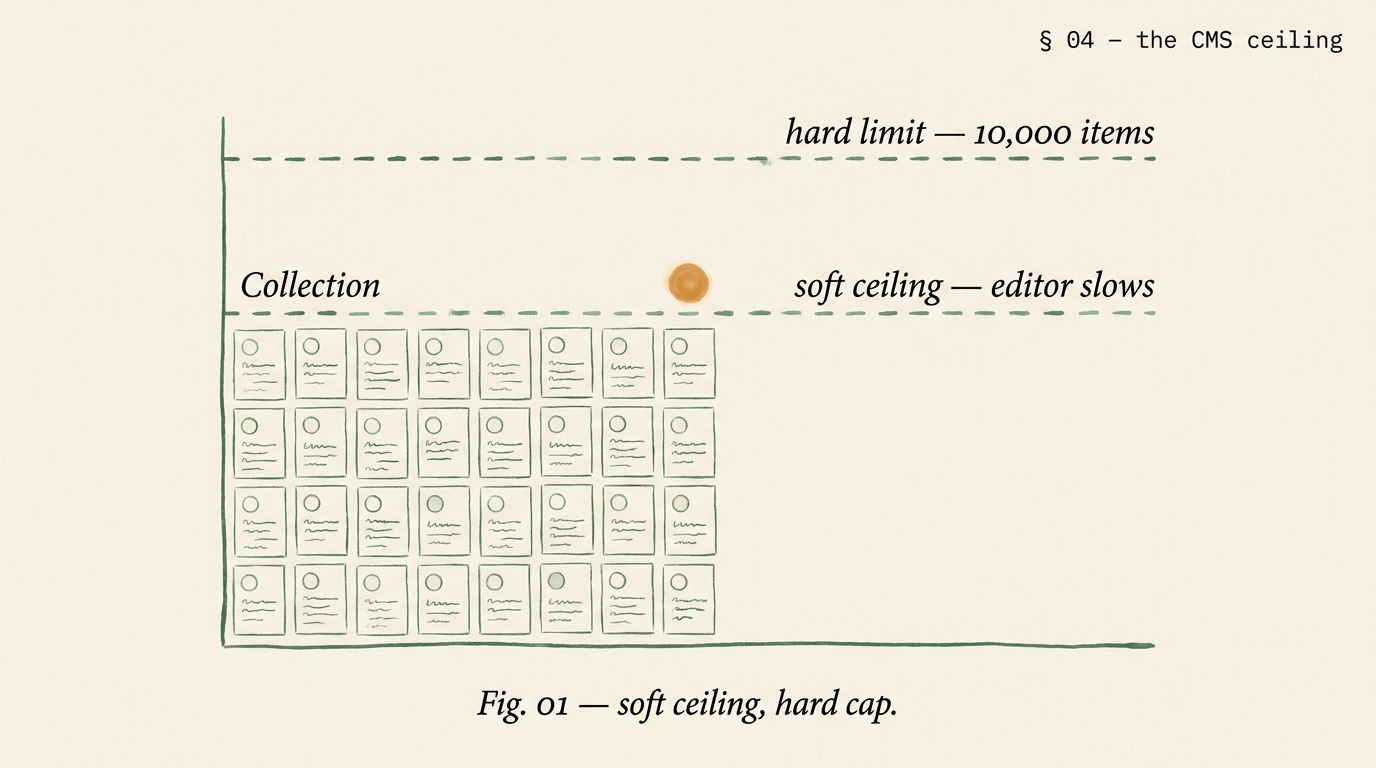
Hard cap 10,000 CMS items per site on Business plan. The soft ceiling arrives at 3,000 items when editor UX slows. Faceted filtering degrades past 1,500. Reference fields stutter past 500 per collection. Know these numbers before you commit a content strategy.
ceiling 02 · logic + memberships
Three tiers, basic rules.
Logic handles form routing and simple branching. Memberships covers 3 access tiers and basic paywalls. Past 5 tiers, per-user permissioning, subscription billing logic, or any real workflow engine, the platform runs out.
ceiling 03 · integration
No server-side logic.
Webflow has no request-time server code, no background jobs, no database queries beyond the CMS. Zapier and Make cover low-volume automation. Past 10K events a day, you need a real backend.
§ 02 · when webflow wins
Six fit signals, honestly named.
Webflow is not a compromise platform. For brands whose site is primarily a marketing surface and whose editor is a designer or a marketer, it ships faster than anything else, looks better than anything else, and costs less to maintain than anything else. The signals below are how we test fit before quoting.
signal 01
Designer edits daily.
The person editing the site is a designer or a marketer, not an engineer. Webflow gives them pixel control without tickets.
signal 02
CMS under 3,000 items.
Articles, case studies, team members, products, events. If total CMS item count stays comfortably under the soft ceiling, Webflow shines.
signal 03
Brand-led, not feature-led.
The site sells the brand's ideas, not a SaaS product with 40 interactive features. The design is the product.
signal 04
Small engineering bandwidth.
No dedicated web engineer or the engineering team is busy with the product. Webflow removes the dependency.
signal 05
International reach limited.
Under 3 locales, straightforward hreflang, no complex regional pricing. Webflow Localization covers this cleanly.
signal 06
Simple auth, if any.
Maybe 3 gated tiers, not a per-user app. Memberships handles this; past it, move to Xano or rebuild.
§ 03 · the seam, in motion
Webflow is a door. We work both sides of it.
The visual Designer and the rendered code are the same page in two languages. Agencies that only speak one will hit a wall. We build in Designer, then ship custom code blocks, Webflow API integrations, and when needed, a parallel Next.js frontend against the same CMS.
Fig. 1 · the seam · composed on one side, shipped on both
§ 04 · the cms ceiling, named
Hard limits live in the docs. Soft limits live in the dashboard.
Webflow publishes its hard caps. It does not publish the soft-ceiling numbers where editor UX starts degrading, reference lookups start stuttering, or publish times start breaking 90 seconds. Those numbers are the ones that actually matter. The table below is what we measure on every audit.
Fig. 1 · soft ceiling, hard cap · the two Webflow CMS limits
dimension
hard limit
soft ceiling we see
what breaks first
items per site
10,000
3,000
editor item list pagination slows
items per collection
10,000
2,000
collection page render time on complex templates
reference fields per collection
10
5
publish time, CMS API response size
multi-reference options
500
150
editor dropdown UX
fields per collection
30
20
editor form scroll fatigue
site publish time
unlimited
90s max tolerable
editorial velocity, fear of publishing
localization variants
unlimited
3 locales
translation workflow overhead
§ 05 · logic + memberships
Logic is a router. Memberships is a gate. Neither is an app.
Webflow Logic routes form submissions, sends conditional emails, and runs if-then branches on submitted data. Webflow Memberships gates content by user tier and handles basic paywalls. Both are good at their jobs. Both are often asked to do jobs they were not designed for. The decision matrix below is what we use to tell when Logic and Memberships cover the requirement and when they do not.
logic + memberships · inside the box
✓Contact form routing by department, size, geography
✓Newsletter gating (free / paid / premium, up to 3 tiers)
✓Event registration with automated confirmation email
✓Community gating for Discord or Slack invite automation
×Data-driven pages querying a live database at request time
×Workflow orchestration with retries, scheduling, long-running jobs
When the brief sits in the right column, we either bolt Xano to Webflow or recommend moving off Webflow entirely. Both are legitimate answers.
§ 06 · custom code + data layer
Webflow plus one external system covers most of the ceiling gaps.
Before recommending a full migration off Webflow, we test whether a single external system solves the specific ceiling the brand has hit. Xano for custom API and auth. Airtable for structured content operations. Supabase for real-user databases. A Cloudflare Worker for request-time logic. In about 60 percent of the "we have outgrown Webflow" briefs we see, the real answer is one added system, not a rewrite.
stack 01
Xano + Webflow.
No-code backend with real databases, custom API, auth. Webflow is the presentation; Xano runs the logic. Cleanest combo for SaaS marketing sites with a customer portal.
stack 02
Airtable + Webflow.
Content ops in Airtable, synced to Webflow CMS via Whalesync or direct API. For teams that write in Airtable and publish to the web.
stack 03
Supabase + Webflow.
Real Postgres database with row-level security. For brands that need per-user dashboards, saved state, or a genuine user system while keeping the marketing site on Webflow.
stack 04
Cloudflare Workers.
Edge compute for request-time logic Webflow cannot do: geo-routing, A/B tests, personalization, signed URLs, rate-limited form submission.
§ 07 · seo + cwv on webflow
Webflow does not hurt SEO. Lazy setup does.
Webflow renders server-side, ships clean HTML, and supports every major schema type through custom code. The SEO failures we inherit on Webflow audits are always setup failures, never platform failures. The list below is the pass every launch runs through.
the ten-point webflow SEO + CWV pass
Title and meta description custom-field pattern on every collection template, no defaults
Schema (Article, Product, Breadcrumb, FAQPage, LocalBusiness) via Embed blocks in page-level custom code
Canonical tag on every CMS detail page, verified not duplicated across filter URLs
robots.txt tuned to block utility-page paths and CMS edit previews
XML sitemap generated via Webflow and ping verified against Search Console
Hreflang alternate links set up via Webflow Localization for multi-region sites
All non-hero images set to lazy-load, served in WebP where possible, width and height attributes set
Third-party scripts moved from site-wide header to page-level custom code, deferred
Font loading optimized: preconnect, font-display swap, subset where fonts support it
Core Web Vitals measured post-launch via Search Console field data; target LCP < 2.0s, INP < 180ms, CLS < 0.05
§ 08 · the code door
When Webflow runs out, we plan the exit.
If the readiness audit concludes Webflow is the wrong platform for the next three years, we plan the migration. Four paths cover 95 percent of exits. The pick depends on whether the brand's site is primarily content, app-shared, or commerce.
path 01 · webflow → next.js
React-first, content-heavy.
Next.js on Vercel, content sourced from a headless CMS (Sanity, Contentful, or Payload). For SaaS brands that need React interactivity or a shared codebase with their product.
path 02 · webflow → headless WordPress
Editor-heavy, content volume high.
WordPress with Gutenberg as the editor; Next.js frontend consuming it via WPGraphQL. Good for content teams past 3K items with editorial workflows that need roles, permissions, and revisions.
path 03 · webflow → classic WordPress
Budget-conscious, editor-first.
Native Gutenberg block theme on WordPress. Lower ongoing cost, editor-led, widest plugin ecosystem. See our WordPress development practice for the shape of the work.
path 04 · webflow → Shopify
Commerce took over.
The brand became primarily ecommerce. Move content to Shopify pages or a thin headless content layer; checkout and catalog on Shopify. See our Shopify development and Shopify migration pages.
the migration guarantee
Every migration ships with a URL-by-URL 301 map reviewed by the client, structured-data preservation across Article and Product schema, and a 90-day post-launch ranking watch in Search Console where any URL that drops more than 5 positions gets a same-week remediation pass. 99 percent URL preservation is the target we publish on every exit.
§ 09 · proof · two shapes
Two archetypes. One stayed, one moved.
Patterns we have shipped for design-led brands. Metrics are the shape of the work, not a single client's figures.
archetype 01 · design studio, 1,200 CMS items
Stayed on Webflow + added Xano.
Client work portfolio hitting Webflow Memberships limits: needed per-client private review pages, comment threads, approvals. Added Xano as auth and data layer, kept Webflow as the public site and visual system. 6-week engagement, no migration, site editor velocity preserved.
engagement
6 wks
no rewrite
LCP mobile
1.6s
from 2.4s
private pages
unlimited
via Xano
archetype 02 · B2B SaaS, 6,500 CMS items
Moved: Webflow → Next.js + Sanity.
Marketing site past the 3,000-item soft ceiling with 40 per-persona landing pages, 3 locales, and a product documentation layer. Readiness audit recommended the exit. 14-week migration to Next.js with Sanity CMS, Vercel deployment, ISR on all CMS pages. URL preservation 99.2 percent.
LCP mobile
1.1s
from 2.6s
URL kept
99.2%
90-day check
editor velocity
preserved
Sanity studio
§ 10 · engagement shapes + fit check
Four shapes. One honest fit test.
Most briefs land in one of four shapes. The readiness audit comes first because we refuse to quote a build or a migration before we have read the existing site or the brand's growth plan.
shape 01
Readiness audit.
2 weeks. Ceiling check, SEO + CWV pass, written plan. Refundable. Contact for quote.
shape 02
Custom build.
6-10 weeks. Style guide, CMS, Logic, Memberships, SEO pass. Contact for quote.
×Content volume over 3K items and no plan to stay flat
×App-like interactivity throughout, not just marketing
×Complex auth, subscription billing, or real user system needed
×You want the lowest hourly on the market; we are not it
§ 11 · questions
Seven answers.
When does Webflow run out and we need to move?
Three signals. One, your CMS is past 3,000 items and editors report the dashboard is sluggish; the hard ceiling of 10,000 is coming. Two, you need more than 3 membership access tiers, per-user permissioning, or real subscription billing; Webflow Memberships tops out. Three, you need server-side logic, a background job, or request-time database queries; Webflow does not do those. If none of the three are true, Webflow is probably still the right platform and moving would be premature. We publish a written readiness report before we take any migration engagement.
How much does a custom Webflow build cost in 2026?
Mid-market custom Webflow work in the US and UK runs $110 to $165 per hour for senior designer-developers. A 20 to 40 page custom Webflow build with a proper style guide, CMS architecture, Logic automation, Memberships setup, and custom code integration runs 6 to 10 weeks. Webflow plus an external data layer (Xano, Airtable, Supabase) for brands past the CMS ceiling runs 8 to 14 weeks. A readiness audit is 2 weeks and is refundable. Scoped quote in 48 hours of an intro call.
Does Webflow hurt SEO compared to WordPress or Next.js?
No, when built carefully. Webflow ships clean HTML, supports custom title and meta fields, schema markup through custom code blocks, and renders server-side so crawlers see full content. The common Webflow SEO failures are unforced errors: missing schema, broken canonical on duplicate CMS detail pages, faceted-nav URLs getting indexed, or images not properly lazy-loaded. Our builds ship with Product, Article, BreadcrumbList, and FAQPage schema via custom code, canonical integrity review, robots.txt tuning, and hreflang for multi-region brands.
Can we use Webflow with a custom backend like Xano or Supabase?
Yes, and for brands past the CMS or Logic ceiling this is the clean path. Webflow stays the presentation layer and design surface. Xano, Airtable, or Supabase hold user data, complex permissions, subscription state, and anything that needs real queries. We wire the two via the Webflow Forms API, Webflow CMS API, and server-side JS in page embeds or Cloudflare Workers. The trade-off is a second system to maintain, but for brands under 20K CMS items with serious user-logic needs, the combination often beats a full Next.js rewrite.
How do you handle Core Web Vitals on Webflow?
Same fundamentals as any platform, plus a few Webflow-specific moves. Lazy-load all non-hero images with the native Webflow setting. Use the newer responsive images markup where supported. Move third-party scripts to page-specific embeds rather than the site-wide header. Preconnect Google Fonts. Use Webflow's native video embed instead of full YouTube iframes. On collection pages, minimize reference field depth to reduce render cost. Across about 40 Webflow sites we have shipped, 90th-percentile mobile LCP averages around 1.8 seconds and INP around 160 ms.
Webflow vs WordPress vs Next.js - which should we pick?
Webflow wins when the team editing the site daily is a designer or marketer, when the CMS is under 3,000 items, and when you want pixel-level design control without hiring an engineer. WordPress wins when editorial volume is high, when plugins cover the custom logic you need, and when the team includes or can hire PHP capability. Next.js wins when you need React-level interactivity, custom application logic, a mobile app sharing code, or CWV ceilings Webflow cannot hit. We build all three and pick based on who edits daily, not based on ideology.
Who owns the Webflow site, domain, and assets at the end of an engagement?
You do. The Webflow account is on your billing from day one. The custom domain is registered under your organization. Style guide, Figma source files, and brand assets live in a workspace you own. We are added as named collaborators to the Webflow workspace with the minimum access we need, and you remove us any time. On exit, we hand off a recorded editor training Loom, a documented component library, and a 30-day support tail for questions. No lock-in, ever.
Start with the readiness audit.
Two weeks. Ceiling check, SEO + CWV pass, written plan. Refundable against any engagement that follows. Scoped quote in 48 hours.