Shopify maintenance, run like a care plan.
A monthly Shopify care plan with severity-tiered SLAs, six vitals under continuous watch, a named incident protocol, and a health report in your inbox every 30 days. Built for stores that can't afford to be the ones who find the bug first.
A 24-hour ops schedule, before your first customer clicks.
A Shopify care plan is a continuous operating rhythm, not a monthly bucket of fix tickets. Every hour of every day, a monitor runs against your store, a log gets written, and a human decides whether anything needs a response. Below is a redacted view of what happens in a normal 24 hours on a Plus care plan.
| Hour | Check | What fires |
|---|---|---|
| 00:00 | Uptime ping | Admin API, Storefront API, checkout URL. 3 endpoints, 3 regions. |
| 01:00 | Checkout synthetic | Hourly test-card run against live store. Catches a broken checkout before your customers do. |
| 03:00 | Webhook delivery | Delivery success rate across Shopify webhooks to your ERP, email, and subscription apps. |
| 06:00 | Core Web Vitals | Lighthouse run on your top 5 URLs. LCP, INP, CLS logged against web.dev thresholds. |
| 08:00 | Changelog scan | Shopify platform changelog parsed for API deprecations, Functions updates, Plus-only changes. |
| 10:00 | App version watch | Your installed apps cross-checked against vendor changelogs. Breaking versions flagged for manual review. |
| 12:00 | Theme diff | Git-backed diff of theme code. Unexpected edits (from team, from apps) open a ticket for review. |
| 14:00 | Inventory + order sanity | Order count vs trailing 7-day baseline. A sudden 40% drop opens S2; a 90% drop opens S1. |
| 16:00 | Error budget review | Sentry errors bucketed by surface. Regressions beyond budget get scheduled into the ticket queue. |
| 20:00 | SEO crawl spot-check | A partial crawl via Googlebot-style fetch on 50 URLs. 4xx, 5xx, and robots directives logged. |
| 23:59 | Daily rollup | Metrics written to your care-plan ledger. Tomorrow's on-call sees yesterday's full shape in 30 seconds. |
No public Shopify maintenance page we have audited publishes this schedule. Most agencies describe "ongoing monitoring" without naming what is monitored or when. The schedule above is a standard Plus plan shape; Essentials runs a subset, Critical runs a faster cadence with five-minute uptime pings and 24/7 on-call. The full severity matrix sits further down the page in section § 06.
Who a Shopify care plan fits, and who it does not.
A care plan is a flat-monthly service. It pays off when the cost of your store being wrong for an hour is larger than the cost of the plan. That is the test. If the answer is "not yet," we will tell you so during the discovery call and point you at Hire Shopify Hours or a one-off fix instead.
- $50K to $5M per month revenue on Shopify or Shopify Plus, with the store as your primary revenue surface.
- Dependence on third-party apps that ship breaking updates (Klaviyo flows, ReCharge subscription, Gorgias helpdesk, Yotpo reviews, custom integrations).
- A checkout that carries your margin: Shopify Plus checkout extensibility, post-purchase upsells, custom payment flows, or B2B catalog pricing.
- A team smaller than six people where nobody is the named "store owner" in engineering terms, and nobody wakes up at 2am to a down alert.
- A migration or Plus upgrade on the 12-month horizon (Scripts to Functions, checkout.liquid sunset, Markets rollout) that needs steady-hand execution.
- An internal engineering lead who wants a care plan to handle "the stuff that never ships feature value" so the team can ship feature value.
- Pre-launch or under $20K per month revenue. You do not yet have enough at stake to justify the plan. We will point you at a one-off Store Health Audit instead.
- A full in-house engineering team. If you already run on-call, monitoring, and incident protocol, we are duplicating work. Consider an advisory retainer.
- Shopping for the cheapest possible flat monthly. Care plans are priced for the SLA, not the ticket volume. Cheap care plans price on volume and will cut SLA corners when the month gets busy.
- Expecting full feature development inside the plan. Engineering hours cover fixes, small features, and upgrades. Large feature projects run separately so they do not crowd the SLA pool.
- Currently between agencies with low trust. Start with a two-week audit. Both sides get a concrete artifact before either commits to 12 months.
- Wanting one generalist "Shopify expert" on Slack. We ship on-call rotation, not a single human. If the shape you want is one person, Hire Shopify Experts fits better.
If your answer sits between the two columns, book a call anyway. The discovery is free and the two-week audit is a standalone commitment: the deliverable is yours whether or not the plan starts after it.
A month, collapsed into a single line.
Every daily uptime ping, every weekly app-compatibility scan, every Shopify security patch we verified, and one single amber moment where something broke and we cleared it. The animation below is an idealised view of what a Plus care plan looks like across 30 days.
The ledger is the frame we use internally. Every day, the on-call engineer opens the ledger for yesterday and scans it in 30 seconds. Every 30 days, the client gets a version of this ledger as a written monthly health report (section § 09). The framing keeps both sides of the engagement honest: we never have to remember what happened, and you never have to ask.
The Six Vitals under continuous watch.
Most "Shopify ongoing maintenance" offerings describe monitoring in abstract nouns. The Six Vitals are a specific, named frame: six signals, six thresholds, six runbooks. A care plan exists to keep each vital inside its threshold.
Uptime.
Admin API, Storefront API, and your live checkout URL pinged every minute (Plus, Critical) or every five minutes (Essentials). 3 regions so a regional Shopify outage does not look like your store is down. On-call paged within 60 seconds of a failed check.
Core Web Vitals.
LCP, INP, CLS tracked against live CrUX field data plus Lighthouse synthetic runs. A metric drifting past the 75th-percentile threshold opens a ticket before Search Console reports it.
App compatibility.
A named watchlist across every app on your store. Klaviyo, ReCharge, Gorgias, Shopify App Store listings cross-checked. Breaking vendor versions flagged before your auto-update fires.
Theme integrity.
Your theme lives in GitHub under our pipeline. Diff alerts when theme files or settings change unexpectedly, including accidental edits from your team and from app-installed snippets. Rollback is a single command, 30 seconds start to finish.
Security posture.
Shopify handles PCI DSS 4.0 on the platform side. Your apps and your merchant-side configuration handle a separate set of obligations covered by PCI SSC. We track both and flag drift. Section § 07 covers the boundary in detail.
Checkout success.
An hourly synthetic checkout runs against your live store with a test card. Add to cart, checkout, payment, confirmation. If the funnel breaks, the alert fires before your next real customer sees a 500. One of the two checks the founder of the business can watch without us.
Why six, not ten. We tested a wider set early. Vitals that overlap with Shopify's own incident reporting (platform status, CDN health) stayed in our tooling but moved out of the client-facing frame. Six is the number a client can actually read in the monthly report without skimming. More than six stops being a dashboard and starts being noise.
Essentials, Plus, or Critical.
Three tiers, scoped by revenue and by SLA needs. Hours roll over one month forward. Overage is billed at the month's effective rate, not a premium. Pricing is quoted within 48 hours of a discovery call; we will not publish the number because scope moves it more than any rate card captures.
| Essentials | Plus | Critical | |
|---|---|---|---|
| Monthly hours | 10–12 | 20–25 | 40+ |
| Vitals covered | 5 of 6 | 6 of 6 | 6 of 6 + 5-min uptime |
| SLA tiers | S2, S3, S4 | S1, S2, S3, S4 | S1 (24/7), S2, S3, S4 |
| Uptime check cadence | 5-min | 1-min | 1-min + 5-min secondary |
| Checkout synthetic | Daily | Hourly | Every 15 min |
| On-call coverage | Business hours | Extended hours + S1 24/7 | 24 hours, 7 days |
| Health report | Quarterly | Monthly written | Weekly snapshots + monthly |
| Plus migration tracking | — | Included | Included + owned roadmap |
| PCI boundary review | Annual | Quarterly | Quarterly + app audit |
| Typical revenue fit | $50K–$500K/mo | $500K–$2M/mo | $2M+/mo |
| Commitment | Month-to-month after 90 days | Month-to-month after 90 days | Month-to-month after 90 days |
Not ready to commit? Start with a two-week Store Health Audit.
Full six-vitals diagnostic, prioritised fix roadmap, PCI shared-responsibility review, app compatibility matrix, Plus migration gap analysis. The deliverable is yours whether or not the plan starts after it.
Response SLAs, by severity tier.
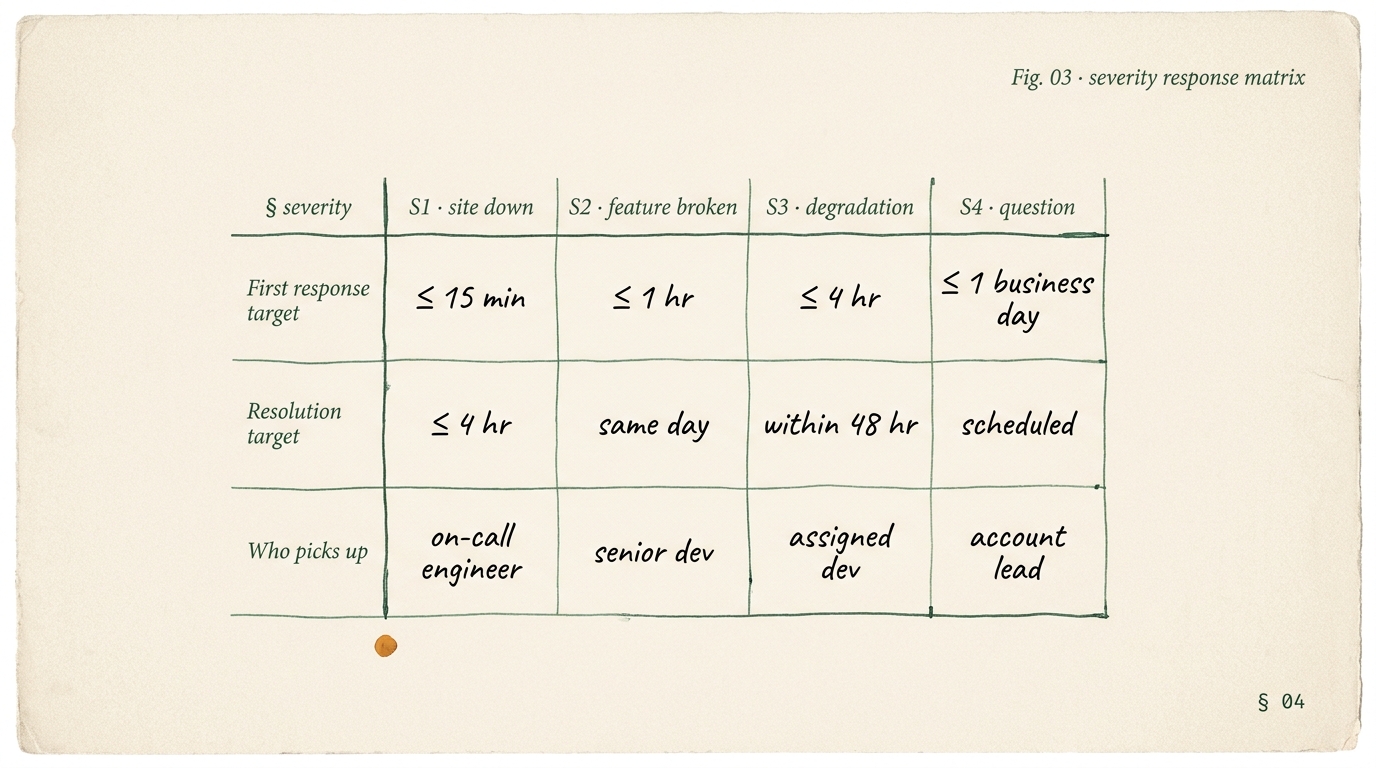
Four severity classes: site down, feature broken, degradation, question. We publish the response time against each class so you can stress-test us against your store's realities before you sign. Most competing Shopify maintenance pages publish nothing. When they do, they publish averages, not commitments.
What counts as a Severity 1.
Site down. Checkout fully broken for any customer. Critical flow returning 500 errors. Order processing stalled. Data loss in progress. Any event where revenue is actively blocked for more than 60 seconds. Severity 1 is rare and it triggers a call, not an email.
What counts as a Severity 2.
A specific feature broken: one payment method failing, one country failing checkout, search returning zero results, a widely-used app returning errors. Revenue is degraded, not blocked. Triage happens within 1 hour on Plus.
What counts as a Severity 3.
Degradation: Core Web Vitals slipping, inventory sync lagging, a non-critical app misfiring, an email flow failing intermittently. Quality issues. Revenue loss probable but slow. Triage within 4 hours.
What counts as a Severity 4.
Questions, scheduled feature asks, content changes, "can you review this app we are considering," "can you add this metafield." Everything that is not an incident. Next-business-day response, scheduled into the ticket queue.
"First response" means a human acknowledgement with an initial triage. It does not mean a fix. The resolution column shows our target for shipping the fix, not the ack. Targets are measured monthly and published in your health report.
Shopify security and PCI compliance, by who owns what.
Shopify Payments is PCI DSS 4.0 Level 1 compliant on the platform side. That does not mean your store is fully PCI-clean. There is a shared-responsibility boundary and most merchants never see it until an acquirer's compliance questionnaire lands in the inbox. A Plus or Critical care plan includes quarterly review of that boundary.
| Layer | Shopify owns | Apps own | You own (we help) |
|---|---|---|---|
| Card data handling | Shop Pay, Shopify Payments, Shopify Checkout | Third-party gateways (PayPal, Amazon Pay, Stripe via apps) | Nothing (by design). Never handle cards in custom code. |
| Order data (PII) | Primary store database, encryption at rest | Email, SMS, helpdesk, CRM apps holding PII | App selection, data-flow review, DPAs signed |
| Admin access | 2FA enforcement, audit logs, staff account framework | Each app's own access model | 2FA policy, staff rotation, app permissions audit |
| Code on your theme | Liquid runtime, Shopify CDN | App-installed theme snippets | Your custom code, git history, PR review |
| Pixels + scripts | Checkout Web Pixel framework (sanctioned injection) | Tracking apps (Meta, Google, Klaviyo, etc.) | Consent mode, SAQ A scope management, pixel audit |
| SAQ A attestation | Shopify's own AoC for the platform | — | Your acquirer may require SAQ A from you. We prep you. |
| GDPR / CCPA / DPDP | Data processor role + base tooling | Each app's own controller/processor position | Your privacy policy, cookie banner, data map, sub-processor list |
The quiet risk. Most Shopify stores we audit for the first time fail the "you own" column somewhere. A dozen pixels firing before consent. Two apps holding unencrypted PII in Slack. A theme snippet reading card-form values for "validation." None of these are Shopify's problem to solve, and none show up on Shopify's own compliance posture. They show up on yours. The care plan's quarterly boundary review is how we catch them before an acquirer, a customer, or a regulator does.
What actually happens when the alert fires.
Detect, Triage, Comms, Postmortem. Named so the protocol is the same for every incident regardless of severity, and so nobody on the team improvises under pressure. Below is the time shape of a typical Severity 1 on a Plus care plan.
The monitor trips. The page fires.
An automated check crosses a threshold (checkout 500, API 5xx, LCP drift). The alert routes into our internal Slack channel, opens a ticket in Linear, and pages the on-call engineer via the rotation. We do not wait to see if the next check clears. The first check fails, the page fires.
On-call confirms impact and assigns severity.
On-call engineer opens the alert, reproduces the issue if safely possible, confirms blast radius (which customers, which surface, which revenue), and sets the severity tag. If the event is S1 or S2, a senior engineer joins the channel. The ticket now has a named owner, a severity, and a clock.
You get told before you find out.
For S1 and S2: an email, a private status page update, and for Plus and Critical, a message directly in your Slack channel. The first comm names the issue, the blast radius, the severity, and our current action. Updates land at defined intervals (every 30 min for S1) until resolution. No jargon, no marketing, no "we are investigating" boilerplate for six hours.
Written postmortem, new monitor committed.
Root cause. Timeline (detection, triage, fix, resolution). Blast radius confirmed. Fix applied. The new monitor or runbook we added so the same class of incident cannot recur the same way twice. The postmortem goes into your private GitHub repository under /incidents/ and becomes part of the next monthly health report.
Postmortem culture is the difference between a care plan and a bucket of hours. The protocol turns every incident into a monitor that catches the next one earlier. Over 12 months of a healthy plan, the monitor set grows, the mean-time-to-detect shrinks, and S1 events become rarer.
The one-pager that lands in your inbox on day 30.
Most agency "monthly reports" are an ornamental dashboard screenshot. Ours is a one-page written artifact you can forward to your CEO or your board. Below is the shape of every Plus-tier report.
30 days, summarised.
A written summary of the month's ledger. Uptime percentage against target. Core Web Vitals trendline vs last month. App versions updated. Theme diffs applied. Checkout synthetic pass rate. Any S1 or S2 incidents with postmortem links.
Where the store is drifting.
Three observations with data: one performance trendline (LCP on product pages), one behavioural trendline (checkout completion vs last month), one ops trendline (app compatibility debt). Each with a "so what" line and a recommended action.
The queue for the next 30 days.
A prioritised list of next month's work. Fixes already committed, features you queued, upgrades we are recommending. Estimated hours against each. You approve the list before we bill the next month.
Platform changes coming for you.
Plus-specific deprecations, API version sunsets, new Functions, Markets changes, checkout extensibility updates. Dated, with the action we are planning. Evergreen urgency that is Shopify-imposed, not us. For standard stores this section is shorter; for Plus stores it is usually the most-read part of the report.
The report ships as a plain PDF and a live Notion page. Your team can read it in 10 minutes. Your board can read the first part in 90 seconds. If the report ever feels padded or ornamental, we rewrite the template the next month. The report is the artifact of the plan, not the plan.
Care plan vs project hours vs Shopify experts.
We sell three shapes of Shopify engagement and they do different jobs. Below is the honest comparison. If one of the others fits better, we will say so on the discovery call and route you to the right page.
| Care Plan (this page) | Hire Shopify Hours | Hire Shopify Experts | |
|---|---|---|---|
| Optimised for | Keeping the store healthy | Shipping planned features | Long-running embedded work |
| Monitoring | Yes, continuous, 6 vitals | No | Optional add-on |
| SLA commitment | Severity-tiered, published | Response within 2 business days | Business hours coverage |
| Hour flexibility | Rolls 1 month forward | Burn-down pool, no rollover | Fixed weekly allocation |
| Who decides the work | We do (monitoring + client queue) | You do, fully | Shared with your PM |
| Best when | Store is revenue-critical + small team | Feature backlog, known shape | 6-12 month engagement, deep work |
| Commitment | Month-to-month after 90 days | Per-block, no minimum | 12-week minimum |
Running hot? Start with a care plan.
If the store is live, dependencies are accreting, and one person carries it all, the care plan stops the bleeding first.
Have a spec? Use Hours.
Known feature scope, no monitoring need, predictable throughput: the hours pool is the cleanest engagement shape.
Deep work? Pair with Experts.
Plus migration, headless build, B2B rollout: an embedded expert for 12 weeks, often layered on top of a care plan.
The tools a Shopify care plan actually runs on.
Agencies that sell monitoring without naming the stack are selling a sticker. These are the live tools under every Plus care plan. You see every dashboard. On exit, the dashboards and the runbooks transfer to your account or we help you set up your own.
Better Stack + StatusCake.
1-minute pings across 3 regions, hourly checkout synthetic runs with test cards, status page auto-generation.
Sentry.
Front-end and theme-side error tracking, release tagging, error-budget accounting. Regressions open tickets automatically.
Looker Studio + CrUX.
Core Web Vitals from CrUX field data rendered into your care-plan dashboard. Synthetic Lighthouse runs on the side.
GitHub + Shopify CLI.
Your theme in a private GitHub repo. Shopify CLI pushes, PR-based reviews, rollback in one command.
Linear + PagerDuty.
Severity-tagged tickets in a shared Linear project. PagerDuty rotation handles the on-call paging so no alert falls on a single engineer.
Shopify changelog + app watch.
Daily scan of shopify.dev/changelog, app-vendor changelogs, status.shopify.com. Relevant items become tickets.
Slack + Notion + Loom.
A private Slack channel for your team. Notion for the runbook. Loom for async walkthroughs.
Rewind + Matrixify.
Rewind for product/order rollback. Matrixify for bulk import/export. Weekly snapshots on Plus + Critical tiers.
axe + WAVE + manual.
Automated WCAG 2.2 AA checks at deploy time plus quarterly manual review. ADA and EU Accessibility Act readiness.
The stack is opinionated but not dogmatic. If you already run Datadog, New Relic, Honeycomb, or a custom stack, we fit alongside and bring our runbooks to your tools. The dashboards are yours either way.
Questions buyers ask before a care plan starts.
What is included in a Shopify maintenance plan?
Continuous monitoring of six vitals (uptime, Core Web Vitals, app compatibility, theme integrity, security posture, checkout success), severity-tiered response SLAs, a named four-step incident protocol, a monthly or quarterly health report with trendlines and incident timelines, and a pool of engineering hours for fixes, small features, and upgrades. On Plus tiers you also get hourly checkout synthetic tests, Scripts-to-Functions migration tracking, and a dedicated senior engineer on rotation.
How much does Shopify maintenance cost?
Pricing is scoped to the plan tier and the volume of monthly hours you need. Essentials fits stores up to roughly 500,000 dollars per month of revenue. Plus fits Shopify Plus and B2B catalogs. Critical fits enterprise stores above two million dollars per month. Book a 30-minute care-plan call and we send a scoped quote within 48 hours. Hours roll over one month forward and the SLA is guaranteed regardless of whether you use the hours.
Do I need a Shopify care plan if I am already on Shopify Plus?
Shopify Plus includes a Merchant Success Manager, priority 24/7 platform support, and higher API limits. It does not include ongoing engineering work on your theme, your apps, your integrations, or your checkout customizations. A Plus care plan sits beside Shopify's own support and handles the part Shopify cannot touch: your code, your apps, your data, your Scripts-to-Functions migration, and your checkout.liquid sunset plan.
What is the difference between a Shopify care plan and a project retainer?
A care plan is a proactive product. Monitoring runs whether or not you open a ticket. SLAs commit us to a response regardless of workload. Hours are spent on both fixes and planned upgrades. A project retainer is a burn-down bucket of engineering hours where you queue the work. If you want someone watching the store and answering pages at 2am, that is a care plan. If you want to schedule feature work with predictable throughput, that is the retainer we ship separately as Hire Shopify Hours.
Who handles PCI compliance on Shopify: Shopify, our apps, or us?
Shopify Payments is PCI DSS 4.0 Level 1 compliant and handles the platform side of card data handling. That covers Shopify Checkout, Shop Pay, and Shopify Payments. It does not cover your installed apps, your custom scripts, your email and SMS systems where order data may flow, or your merchant-side obligations for SAQ A attestation if you trigger it. A Plus or Critical care plan includes quarterly review of your merchant-side PCI boundary, app data-flow review, and SAQ A readiness.
How fast will you respond if the site goes down?
Plus and Critical care plans: Severity 1 (site down, checkout broken, revenue at risk) gets a 15-minute acknowledgement target and a 4-hour resolution target. An on-call engineer picks it up. You do not wait for business hours. Essentials is business-hours only and catches S2 through S4 events with the same matrix on a shifted clock. Full severity matrix is published on the page, not hidden behind a quote.
Can I pause or cancel my Shopify care plan?
Yes. Month-to-month after the first quarter. Two events require a minimum commitment window: the initial onboarding (30 days, one-time), and a Plus-tier migration project layered on top of the plan (for the duration of the migration). Outside those, you give 30 days notice and the plan ends cleanly. Monitoring access, documentation, runbooks, and the private GitHub repository all transfer to you on exit.
30 minutes, scoped quote within 48 hours.
We listen to the store, ask 8 diagnostic questions, confirm plan fit, and send the quote. No sales deck, no hour-long slide show. If the care plan is not right for you, we say so and point you at Hire Shopify Hours or a one-off audit instead.